

Robot Data Maintenance: Explain a CSV Record Split
2026-11-01
Robot Data Maintenance: Explain a CSV Record Split
A robotics data import can appear to gain extra rows when a note field contains a line break. The maintenance question is whether the input, the parser and the display are being counted in the same way. Reporting a changed row count as data corruption before inspecting the representation can hide the actual problem. The example here is hypothetical and contains no real industry dataset or measured import results.
Define the observed split before editing the source
Imagine a receiver who opens an exported table in a line-oriented viewer and then compares it with an import preview. A descriptive field occupies more than one visible line in the first view. The receiver should record which view showed the apparent split and which export was used. The word row should not be left to mean both a screen line and a parsed record without explanation.
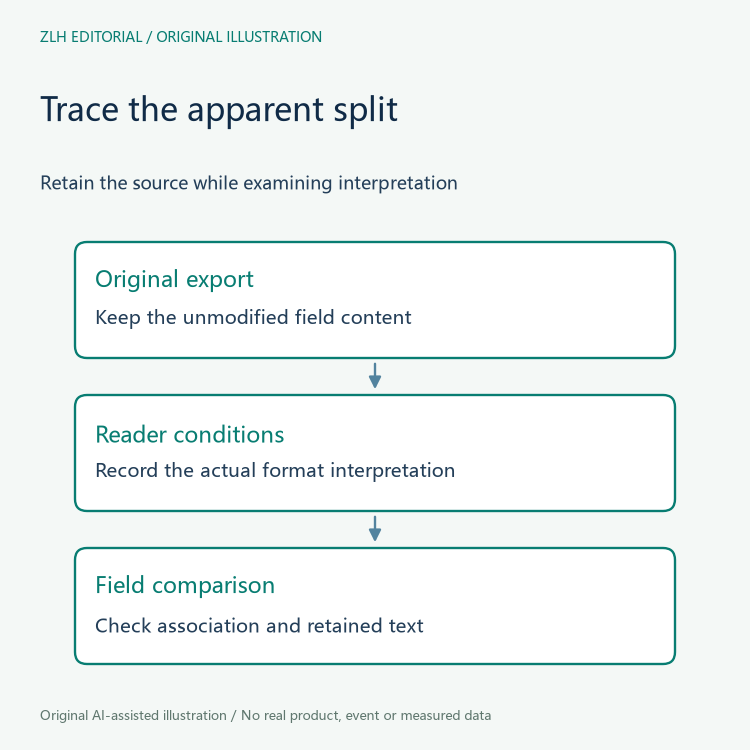
Preserve the original export before making any presentation changes. Deleting line breaks may make the file look tidy while changing the note that the supplier intended to provide. An investigation should be able to compare the unmodified representation with the importer settings and the resulting display. An edited copy can be retained as a separate proposal, not substituted for the evidence received.
Quoted fields can include line breaks
The informational RFC 4180 describes CSV fields containing line breaks, commas or double quotes within quoted fields. Its description explains why a physical line boundary need not be a record boundary in such a representation. It should not be presented as proof that every vendor export follows one identical CSV dialect.
For the fictional incident, ask what format the exporter declares and what the receiving tool expects. Identify the field that contains the visible break and preserve its surrounding quotation context. A screenshot cropped to the middle of the field can remove the very information needed to understand its structure. Do not assume that an unexpected screen layout proves that a record has been added or lost.

Record the parser conditions, not just the application name
The Python csv documentation discusses opening a file with newline handling suitable for its reader and permits format details to be supplied through dialect and formatting parameters. This illustrates why the receiving conditions belong in an import note. It is not a claim that a particular application uses that module or that changing one setting will resolve every split.
The responsible investigator can record the actual reader and the relevant input interpretation it used. If those details were not captured, mark them unknown rather than copying settings from a different tool. The format described by the supplier and the format selected by the importer should be separately identifiable even when they later turn out to agree.
Compare the affected field as content and as structure
In the imagined record, compare the text the supplier intended to preserve with the text shown after parsing. Ask whether the line break belongs inside the note and whether the importer retained the surrounding field association. This is more informative than removing every break and reporting success because the preview contains fewer visible lines.
When an authorized re-import is performed, keep it as a separate observation with the input version and conditions. Record what changed in the interpretation and what happened to the affected field. A readable preview can support a narrow statement about that observation; it cannot establish that every record in an unexamined dataset was imported correctly.
The note should also distinguish an actual comparison from an intended check. If the team has not examined the resulting field text, write that as pending work. Do not infer content preservation from a summary count, a green status message or the fact that the file opened without an exception.
Keep a display count distinct from a data count
A team maintaining a public data summary should also keep its displayed count definition next to the import note. A count of screen lines can still be a meaningful interface observation, provided it is not labelled as a count of business records. When the wording changes, record that editorial correction separately from any parser change. Otherwise, the disappearance of a misleading label may later be misremembered as a change to the dataset itself.
Keep the final record count tied to its definition
A clear closing entry says what the team meant by a record, which representation and parser conditions were observed, and whether the affected field's content remained associated correctly. If only a small extract was examined, keep that scope visible. There are no invented row totals or claims of a completed dataset repair in this article.
The original diagrams distinguish textual layout from parsed structure without depicting market data. Related material appears in the robotics data documentation section and the article directory. A maintenance record that preserves the original export and explains its boundaries gives later analysts evidence they can assess instead of an unexplained promise that extra rows were removed.


